A To generate a debug file from the Shipping Transaction or Quick Ship forms in version 11.5.9 (Family pack I) or higher:
Set the following profile options:
OM: Debug Level - set to 5
WSH: Debug Enabled - set to Yes
WSH: Debug Level - set to Statement
WSH: Debug Log Directory - any directory that can be written to by the database
To check, run the following SQL statement:
Code:
select value from v$parameter where name = 'utl_file_dir'
Set profile option WSH: Debug Log Directory at the Site & Application Level.
In the Shipping form go to Tools and check the Debug box. This will print out a file name - NOTE down this file name.
Perform the action you wish to debug.
Go to Tools and uncheck Debug.
After you have completed generating the debug file, please set the value of the profile OM: Debug Level back to 0 and WSH: Debug Enabled set to No, otherwise there will be some performance impact. Retrieve the debug file from the directory specified in step 1.
B. To generate debug information for Pick Release in version 11.5.9 (Family pack I) or higher:
Set the following profile options:
OM: Debug Level - set to 5
INV: Debug Level - set to 10
WSH: Debug Enabled - set to Yes
WSH: Debug Level - set to Statement
In the Release Sales Order for Picking form go to Tools and check the Debug box.
Submit the pick release.
Provide the Pick Selection List Generation log file.
C. To generate debug information for Pick Release prior to version 11.5.9 (Family pack I):
Set the following profile options:
OM: Debug Level - set to 5
INV: Debug Level - set to 10
In the Release Sales Order for Picking form go to Tools and check the Debug box.
Submit the pick release.
Provide the Pick Selection List Generation log file.
D. To generate debug information for Interface Trip Stop - SRS in version 11.5.9 (Family pack I) or higher:
Set the following profile options:
OM: Debug Level - set to 5
INV: Debug Level - set to 10
WSH: Debug Enabled - set to Yes
WSH: Debug Level - set to Statement
Set the Debug Level parameter to 1 (Debugging ON) .
Submit the job.
Provide the log file.
E. To generate debug information for Interface Trip Stop - SRS prior to version 11.5.9 (Family pack I):
Set the following profile options:
OM: Debug Level - set to 5
INV: Debug Level - set to 10
Set the Log Level parameter to 1 (Debugging ON) .
Submit the job.
Provide the log file.
F. To generate debug information for an API in 11.5.9 (Family pack I) or higher:
Set the following profile options:
OM: Debug Level - set to 5
INV: Debug Level - set to 10
WSH: Debug Enabled - set to Yes
WSH: Debug Level - set to Statement
WSH: Debug Log Directory - set to a valid writeable directory path
Add the following line of code in the wrapper script which calls the API:
Code:
DECLARE l_file_name VARCHAR2(32767);
l_return_status VARCHAR2(32767);
l_msg_data VARCHAR2(32767);
l_msg_count NUMBER;
BEGIN
fnd_profile.put('WSH_DEBUG_MODULE','%');
fnd_profile.put('WSH_DEBUG_LEVEL',WSH_DEBUG_SV.C_STMT_LEVEL);
wsh_debug_sv.start_debugger(l_file_name,l_return_status,l_msg_data,l_msg_count);
Submit the job.
Provide the log file.
G. To generate debug information for an API prior to version 11.5.9 (Family pack I):
Set the following profile options:
OM: Debug Level - set to 5
INV: Debug Level - set to 10
Add the following lines of code in the wrapper script which calls the API:
Code:
oe_debug_pub.initialize; oe_debug_pub.SetDebugLevel(5);
DBMS_OUTPUT.PUT_LINE('Debug File = ' ||OE_DEBUG_PUB.G_DIR||'/'||OE_DEBUG_PUB.G_FILE);
Friday, November 11, 2011


Friday, July 8, 2011
On Hand Qty Query
SELECT SUM (target_qty), item_id, subinv
FROM (SELECT moqv.subinventory_code subinv
,moqv.inventory_item_id item_id
,SUM (transaction_quantity) target_qty
FROM mtl_onhand_qty_cost_v moqv
WHERE moqv.organization_id = :org_id
AND moqv.inventory_item_id = :item_id
AND moqv.subinventory_code =
NVL (:subinventory_code, moqv.subinventory_code)
GROUP BY moqv.subinventory_code
,moqv.inventory_item_id
,moqv.item_cost
UNION ALL
SELECT mmt.subinventory_code subinv
,mmt.inventory_item_id item_id
,-SUM (primary_quantity) target_qty
FROM mtl_material_transactions mmt, mtl_txn_source_types mtst
WHERE mmt.organization_id = :org_id
AND transaction_date >=
NVL (TO_DATE (:hist_date), TRUNC (SYSDATE))
+ 1
AND mmt.transaction_source_type_id =
mtst.transaction_source_type_id
AND mmt.inventory_item_id = :item_id
AND mmt.subinventory_code =
NVL (:subinventory_code, mmt.subinventory_code)
GROUP BY mmt.subinventory_code, mmt.inventory_item_id) oq
GROUP BY oq.item_id,subinv
FROM (SELECT moqv.subinventory_code subinv
,moqv.inventory_item_id item_id
,SUM (transaction_quantity) target_qty
FROM mtl_onhand_qty_cost_v moqv
WHERE moqv.organization_id = :org_id
AND moqv.inventory_item_id = :item_id
AND moqv.subinventory_code =
NVL (:subinventory_code, moqv.subinventory_code)
GROUP BY moqv.subinventory_code
,moqv.inventory_item_id
,moqv.item_cost
UNION ALL
SELECT mmt.subinventory_code subinv
,mmt.inventory_item_id item_id
,-SUM (primary_quantity) target_qty
FROM mtl_material_transactions mmt, mtl_txn_source_types mtst
WHERE mmt.organization_id = :org_id
AND transaction_date >=
NVL (TO_DATE (:hist_date), TRUNC (SYSDATE))
+ 1
AND mmt.transaction_source_type_id =
mtst.transaction_source_type_id
AND mmt.inventory_item_id = :item_id
AND mmt.subinventory_code =
NVL (:subinventory_code, mmt.subinventory_code)
GROUP BY mmt.subinventory_code, mmt.inventory_item_id) oq
GROUP BY oq.item_id,subinv
Wednesday, November 24, 2010
FINALLY CLOSE -- A PO /PO Line
Following API Can be used to "FINALLY CLOSE" a Standard/Blanket PO at header/line level.
- Given example is at Line level for blanket PO.
- For header level PO close, P_lineid will be passed as null.
- For standard PO , instead of PA use PO.
- If blanket PO line is referred on any OPEN standard PO, then BPA line cannot be changed to FINALLY CLOSE status.
**************************************************
DECLARE
x_action CONSTANT VARCHAR2 (20) := 'FINALLY CLOSE';
-- Change this parameter as per requirement
x_calling_mode CONSTANT VARCHAR2 (2) := 'PO';
x_conc_flag CONSTANT VARCHAR2 (1) := 'N';
x_return_code_h VARCHAR2 (100);
x_auto_close CONSTANT VARCHAR2 (1) := 'N';
x_origin_doc_id NUMBER;
x_returned BOOLEAN;
x_action CONSTANT VARCHAR2 (20) := 'FINALLY CLOSE';
-- Change this parameter as per requirement
x_calling_mode CONSTANT VARCHAR2 (2) := 'PO';
x_conc_flag CONSTANT VARCHAR2 (1) := 'N';
x_return_code_h VARCHAR2 (100);
x_auto_close CONSTANT VARCHAR2 (1) := 'N';
x_origin_doc_id NUMBER;
x_returned BOOLEAN;
CURSOR c_po_details
IS
SELECT pha.po_header_id, pha.org_id, pha.segment1, pha.agent_id
,pha.closed_code, pha.closed_date
FROM apps.po_headers_all pha
WHERE authorization_status = 'APPROVED'
AND pha.closed_code <> 'FINALLY CLOSED'
AND segment1 = '15000002252';
-- Enter the PO Number if one PO needs to be finally closed/Closed
BEGIN
fnd_global.apps_initialize (user_id => 1468
,resp_id => 20707
,resp_appl_id => 201
);
IS
SELECT pha.po_header_id, pha.org_id, pha.segment1, pha.agent_id
,pha.closed_code, pha.closed_date
FROM apps.po_headers_all pha
WHERE authorization_status = 'APPROVED'
AND pha.closed_code <> 'FINALLY CLOSED'
AND segment1 = '15000002252';
-- Enter the PO Number if one PO needs to be finally closed/Closed
BEGIN
fnd_global.apps_initialize (user_id => 1468
,resp_id => 20707
,resp_appl_id => 201
);
FOR po_head IN c_po_details
LOOP
mo_global.init ('PA');
mo_global.set_policy_context ('S', po_head.org_id);
DBMS_OUTPUT.put_line
( 'Calling PO_Actions.close_po for Closing/Finally Closing PO =>'
|| po_head.segment1
);
x_returned :=
po_actions.close_po (p_docid => po_head.po_header_id
,p_doctyp => 'PA' -- "PO" for standard PO
,p_docsubtyp => 'BLANKET' --'STANDARD' for standard PO
,p_lineid => 7885858 -- null if you want to FINALLY CLOSE at header level
,p_shipid => NULL
,p_action => x_action
,p_reason => NULL
,p_calling_mode => x_calling_mode
,p_conc_flag => x_conc_flag
,p_return_code => x_return_code_h
,p_auto_close => x_auto_close
,p_action_date => SYSDATE
,p_origin_doc_id => NULL
);
LOOP
mo_global.init ('PA');
mo_global.set_policy_context ('S', po_head.org_id);
DBMS_OUTPUT.put_line
( 'Calling PO_Actions.close_po for Closing/Finally Closing PO =>'
|| po_head.segment1
);
x_returned :=
po_actions.close_po (p_docid => po_head.po_header_id
,p_doctyp => 'PA' -- "PO" for standard PO
,p_docsubtyp => 'BLANKET' --'STANDARD' for standard PO
,p_lineid => 7885858 -- null if you want to FINALLY CLOSE at header level
,p_shipid => NULL
,p_action => x_action
,p_reason => NULL
,p_calling_mode => x_calling_mode
,p_conc_flag => x_conc_flag
,p_return_code => x_return_code_h
,p_auto_close => x_auto_close
,p_action_date => SYSDATE
,p_origin_doc_id => NULL
);
IF x_returned = TRUE
THEN
DBMS_OUTPUT.put_line
( 'Purchase Order which just got Closed/Finally Closed is '
|| po_head.segment1
);
COMMIT;
ELSE
DBMS_OUTPUT.put_line
('API Failed to Close/Finally Close the Purchase Order');
END IF;
END LOOP;
EXCEPTION
THEN
DBMS_OUTPUT.put_line
( 'Purchase Order which just got Closed/Finally Closed is '
|| po_head.segment1
);
COMMIT;
ELSE
DBMS_OUTPUT.put_line
('API Failed to Close/Finally Close the Purchase Order');
END IF;
END LOOP;
EXCEPTION
WHEN OTHERS THEN
DBMS_OUTPUT.put_line
('Program failed with unexpected error');END;
Wednesday, October 27, 2010
JDeveloper and OAF
How to find correct version of jDeveloper.
1) Login to EBS.
2) In Home page , lower left corner select About this page.
4) For aboove version we can find the required jdeveloper patch in following metalink
416708.1 How to find the correct version of JDeveloper to use with eBusiness Suite 11i or Release 12.x
Profile Options:
1) getting personalization link on page set this profile option-*Personalize Self-Service Defn* to yes
2) for getting about link on page set this profile option-*FND: Diagnostics* to yes.
3) Set profile "Sign-On:Notification" to "No" at site level
1) Login to EBS.
2) In Home page , lower left corner select About this page.
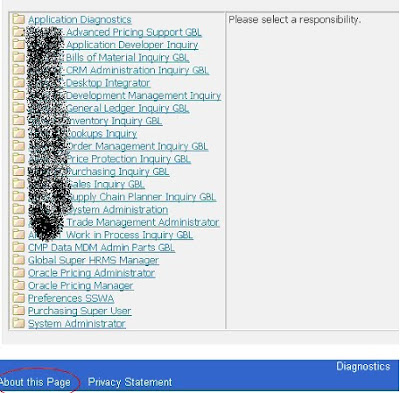
3) Select Technology component and in that we can see OA Framework version

4) For aboove version we can find the required jdeveloper patch in following metalink
416708.1 How to find the correct version of JDeveloper to use with eBusiness Suite 11i or Release 12.x
Profile Options:
1) getting personalization link on page set this profile option-*Personalize Self-Service Defn* to yes
2) for getting about link on page set this profile option-*FND: Diagnostics* to yes.
3) Set profile "Sign-On:Notification" to "No" at site level
Friday, September 17, 2010
Oracle Patches
Tables: AD_APPLIED_PATCHES , AD_BUGS( bug number is the patch number)
Links:
Note: 181665.1 - Release 11i Adpatch Basics
https://metalink2.oracle.com/metalink/plsql/ml2_documents.showDocument?p_database_id=NOT&p_id=181665.1
Note: 457566.1 - Oracle Applications Patching FAQ for Release 11i -- Can I determine ahead of time how a patch will affect my system?
https://metalink2.oracle.com/metalink/plsql/ml2_documents.showDocument?p_database_id=NOT&p_id=457566.1
Oracle Applications Maintenance Utilities -- 11i
http://download.oracle.com/docs/cd/B25516_18/current/acrobat/11iadutil.pdf
Oracle Applications Maintenance Utilities -- R12
http://download.oracle.com/docs/cd/B40089_09/current/acrobat/r12adutil.pdf
How can I track my customizations? What happens to my customizations during patching?
You should apply patches first on a test system. Then, review the changes in the test system and identify the best way to re-integrate customizations affected by the patch.
If you have registered your customized files in $APPL_TOP/admin/applcust.txt, AutoPatch reviews the files to determine if any of those files will be replaced during the application of the patch.
Links:
Note: 181665.1 - Release 11i Adpatch Basics
https://metalink2.oracle.com/metalink/plsql/ml2_documents.showDocument?p_database_id=NOT&p_id=181665.1
Note: 457566.1 - Oracle Applications Patching FAQ for Release 11i -- Can I determine ahead of time how a patch will affect my system?
https://metalink2.oracle.com/metalink/plsql/ml2_documents.showDocument?p_database_id=NOT&p_id=457566.1
Oracle Applications Maintenance Utilities -- 11i
http://download.oracle.com/docs/cd/B25516_18/current/acrobat/11iadutil.pdf
Oracle Applications Maintenance Utilities -- R12
http://download.oracle.com/docs/cd/B40089_09/current/acrobat/r12adutil.pdf
How can I track my customizations? What happens to my customizations during patching?
You should apply patches first on a test system. Then, review the changes in the test system and identify the best way to re-integrate customizations affected by the patch.
If you have registered your customized files in $APPL_TOP/admin/applcust.txt, AutoPatch reviews the files to determine if any of those files will be replaced during the application of the patch.
Friday, July 23, 2010
FND LOAD Scripts in Oracle
Forms Personalizations:
--------------------------------------
$FND_TOP/bin/FNDLOAD (usrname)/(paswrd) 0 Y DOWNLOAD $FND_TOP/patch/115/import/affrmcus.lct ((NAME_OF_LDT)).ldt FND_FORM_CUSTOM_RULES function_name="OZF_FNDLVMLU"
$FND_TOP/bin/FNDLOAD (usrname)/(paswrd) 0 Y UPLOAD $FND_TOP/patch/115/import/affrmcus.lct ((NAME_OF_LDT)).ldt
Form Function:
--------------------------------------
FNDLOAD (usrname)/(paswrd) 0 Y DOWNLOAD $FND_TOP/patch/115/import/afsload.lct ((NAME_OF_LDT)).ldt FUNCTION FUNCTION_NAME='((func name))'
$FND_TOP/bin/FNDLOAD apps/$CLIENT_APPS_PWD O Y UPLOAD $FND_TOP/patch/115/import/afsload.lct ((NAME_OF_LDT)).ldt
Lookups :
--------------------------------------
$FND_TOP/bin/FNDLOAD (usrname)/(paswrd) 0 Y DOWNLOAD $FND_TOP/patch/115/import/aflvmlu.lct ((NAME_OF_LDT)).ldt FND_LOOKUP_TYPE APPLICATION_SHORT_NAME ="XXDIS" LOOKUP_TYPE="((lkp name))"
$FND_TOP/bin/FNDLOAD (usrname)/(paswrd) 0 Y UPLOAD $FND_TOP/patch/115/import/aflvmlu.lct ((NAME_OF_LDT)).ldt
Profile:
--------------------------------------
FNDLOAD (usrname)/(paswrd) 0 Y UPLOAD @FND:patch/115/import/afscprof.lct ((NAME_OF_LDT)).ldt
FNDLOAD (usrname)/(paswrd) O Y DOWNLOAD $FND_TOP/patch/115/import/afscprof.lct ((NAME_OF_LDT)).ldt PROFILE PROFILE_NAME="((NAME_OF_profile))" APPLICATION_SHORT_NAME="CANON"
Concurrent Program:
--------------------------------------
FNDLOAD (usrname)/(paswrd) O Y UPLOAD $FND_TOP/patch/115/import/afcpprog.lct ((NAME_OF_LDT)).ldt
FNDLOAD (usrname)/(paswrd) O Y DOWNLOAD $FND_TOP/patch/115/import/afcpprog.lct ((NAME_OF_LDT)).ldt PROGRAM APPLICATION_SHORT_NAME="XXDIS" CONCURRENT_PROGRAM_NAME="((prg_name))"
Request Group:
--------------------------------------
FNDLOAD (usrname)/(paswrd) O Y UPLOAD $FND_TOP/patch/115/import/afcpreqg.lct ((NAME_OF_LDT)).ldt
FNDLOAD (usrname)/(paswrd) O Y DOWNLOAD $FND_TOP/patch/115/import/afcpreqg.lct ((NAME_OF_LDT)).ldt REQUEST_GROUP REQUEST_GROUP_NAME="System Administrator Reports" APPLICATION_SHORT_NAME="FND"
Flexi field:
--------------------------------------
FNDLOAD (usrname)/(paswrd) 0 Y DOWNLOAD $FND_TOP/patch/115/import/afffload.lct ((NAME_OF_LDT)).ldt DESC_FLEX APPLICATION_SHORT_NAME=PO DESCRIPTIVE_FLEXFIELD_NAME='PO_REQUISITION_LINES'
Flexi field ....category/CONTEXT
--------------------------------------
$FND_TOP/bin/FNDLOAD (usrname)/(paswrd) 0 Y DOWNLOAD $FND_TOP/patch/115/import/afffload.lct ((NAME_OF_LDT)).ldt DESC_FLEX APPLICATION_SHORT_NAME="FND" DESCRIPTIVE_FLEXFIELD_NAME="FND_COMMON_LOOKUPS" DFF_CONTEXT DESCRIPTIVE_FLEX_CONTEXT_CODE="((FLEX_CONTEXT))"
Valuset :
--------------------------------------
FNDLOAD (usrname)/(paswrd) 0 Y DOWNLOAD $FND_TOP/patch/115/import/afffload.lct ((NAME_OF_LDT)).ldt VALUE_SET FLEX_VALUE_SET_NAME="CANON_E379_MERCH_DROPSHIP_WH_VS"
FNDLOAD (usrname)/(paswrd) 0 Y UPLOAD $FND_TOP/patch/115/import/afffload.lct ((NAME_OF_LDT)).ldt
Alert :
-------------------------------------
FNDLOAD (usrname)/(paswrd) 0 Y DOWNLOAD $ALR_TOP/patch/115/import/alr.lct ((NAME_OF_LDT)).ldt ALR_ALERTS APPLICATION_SHORT_NAME='WSH'
FNDLOAD (usrname)/(paswrd) 0 Y UPLOAD $ALR_TOP/patch/115/import/alr.lct ((NAME_OF_LDT)).ldt
--------------------------------------
$FND_TOP/bin/FNDLOAD (usrname)/(paswrd) 0 Y DOWNLOAD $FND_TOP/patch/115/import/affrmcus.lct ((NAME_OF_LDT)).ldt FND_FORM_CUSTOM_RULES function_name="OZF_FNDLVMLU"
$FND_TOP/bin/FNDLOAD (usrname)/(paswrd) 0 Y UPLOAD $FND_TOP/patch/115/import/affrmcus.lct ((NAME_OF_LDT)).ldt
Form Function:
--------------------------------------
FNDLOAD (usrname)/(paswrd) 0 Y DOWNLOAD $FND_TOP/patch/115/import/afsload.lct ((NAME_OF_LDT)).ldt FUNCTION FUNCTION_NAME='((func name))'
$FND_TOP/bin/FNDLOAD apps/$CLIENT_APPS_PWD O Y UPLOAD $FND_TOP/patch/115/import/afsload.lct ((NAME_OF_LDT)).ldt
Lookups :
--------------------------------------
$FND_TOP/bin/FNDLOAD (usrname)/(paswrd) 0 Y DOWNLOAD $FND_TOP/patch/115/import/aflvmlu.lct ((NAME_OF_LDT)).ldt FND_LOOKUP_TYPE APPLICATION_SHORT_NAME ="XXDIS" LOOKUP_TYPE="((lkp name))"
$FND_TOP/bin/FNDLOAD (usrname)/(paswrd) 0 Y UPLOAD $FND_TOP/patch/115/import/aflvmlu.lct ((NAME_OF_LDT)).ldt
Profile:
--------------------------------------
FNDLOAD (usrname)/(paswrd) 0 Y UPLOAD @FND:patch/115/import/afscprof.lct ((NAME_OF_LDT)).ldt
FNDLOAD (usrname)/(paswrd) O Y DOWNLOAD $FND_TOP/patch/115/import/afscprof.lct ((NAME_OF_LDT)).ldt PROFILE PROFILE_NAME="((NAME_OF_profile))" APPLICATION_SHORT_NAME="CANON"
Concurrent Program:
--------------------------------------
FNDLOAD (usrname)/(paswrd) O Y UPLOAD $FND_TOP/patch/115/import/afcpprog.lct ((NAME_OF_LDT)).ldt
FNDLOAD (usrname)/(paswrd) O Y DOWNLOAD $FND_TOP/patch/115/import/afcpprog.lct ((NAME_OF_LDT)).ldt PROGRAM APPLICATION_SHORT_NAME="XXDIS" CONCURRENT_PROGRAM_NAME="((prg_name))"
Request Group:
--------------------------------------
FNDLOAD (usrname)/(paswrd) O Y UPLOAD $FND_TOP/patch/115/import/afcpreqg.lct ((NAME_OF_LDT)).ldt
FNDLOAD (usrname)/(paswrd) O Y DOWNLOAD $FND_TOP/patch/115/import/afcpreqg.lct ((NAME_OF_LDT)).ldt REQUEST_GROUP REQUEST_GROUP_NAME="System Administrator Reports" APPLICATION_SHORT_NAME="FND"
Flexi field:
--------------------------------------
FNDLOAD (usrname)/(paswrd) 0 Y DOWNLOAD $FND_TOP/patch/115/import/afffload.lct ((NAME_OF_LDT)).ldt DESC_FLEX APPLICATION_SHORT_NAME=PO DESCRIPTIVE_FLEXFIELD_NAME='PO_REQUISITION_LINES'
Flexi field ....category/CONTEXT
--------------------------------------
$FND_TOP/bin/FNDLOAD (usrname)/(paswrd) 0 Y DOWNLOAD $FND_TOP/patch/115/import/afffload.lct ((NAME_OF_LDT)).ldt DESC_FLEX APPLICATION_SHORT_NAME="FND" DESCRIPTIVE_FLEXFIELD_NAME="FND_COMMON_LOOKUPS" DFF_CONTEXT DESCRIPTIVE_FLEX_CONTEXT_CODE="((FLEX_CONTEXT))"
Valuset :
--------------------------------------
FNDLOAD (usrname)/(paswrd) 0 Y DOWNLOAD $FND_TOP/patch/115/import/afffload.lct ((NAME_OF_LDT)).ldt VALUE_SET FLEX_VALUE_SET_NAME="CANON_E379_MERCH_DROPSHIP_WH_VS"
FNDLOAD (usrname)/(paswrd) 0 Y UPLOAD $FND_TOP/patch/115/import/afffload.lct ((NAME_OF_LDT)).ldt
Alert :
-------------------------------------
FNDLOAD (usrname)/(paswrd) 0 Y DOWNLOAD $ALR_TOP/patch/115/import/alr.lct ((NAME_OF_LDT)).ldt ALR_ALERTS APPLICATION_SHORT_NAME='WSH'
FNDLOAD (usrname)/(paswrd) 0 Y UPLOAD $ALR_TOP/patch/115/import/alr.lct ((NAME_OF_LDT)).ldt
Friday, July 16, 2010
POCIRM-222: --
Cause: POCIRM encountered an internal error. Parameters: REQIMPORT,,,ITEM,,N,Y,
Action: Note both this error number and the actions you are trying to perform. Contact your system a
POCIRM-222: ORA-06502: PL/SQL: numeric or value error: character string buffer too
Cause: A SQL error has occurred in POCIRM. The SQL error is &LSQL_ERR.
Action:To implement the solution, please execute the following steps
1. DBA should disable/ drop trigger ADS_PO_REQUISITION_HDR_TRG1. This
trigger was created by the ADS team for Demo purpose ONLY. No customer
instance should have this trigger.
This trigger is not a part of the seeded code and can be dropped.]
Document ID: 464573.1 for more detail
Action: Note both this error number and the actions you are trying to perform. Contact your system a
POCIRM-222: ORA-06502: PL/SQL: numeric or value error: character string buffer too
Cause: A SQL error has occurred in POCIRM. The SQL error is &LSQL_ERR.
Action:To implement the solution, please execute the following steps
1. DBA should disable/ drop trigger ADS_PO_REQUISITION_HDR_TRG1. This
trigger was created by the ADS team for Demo purpose ONLY. No customer
instance should have this trigger.
This trigger is not a part of the seeded code and can be dropped.]
Document ID: 464573.1 for more detail
Subscribe to:
Posts (Atom)
